School Asset Management Software
Extend the life of your school assets

Manage all of your district assets, from HVAC units to student laptops. Keep them running longer. Find what you need fast. Make smarter long-term decisions.
Find out more about these key features
Schools are unlocking efficiency with asset management software


Explore the key features of school asset management software

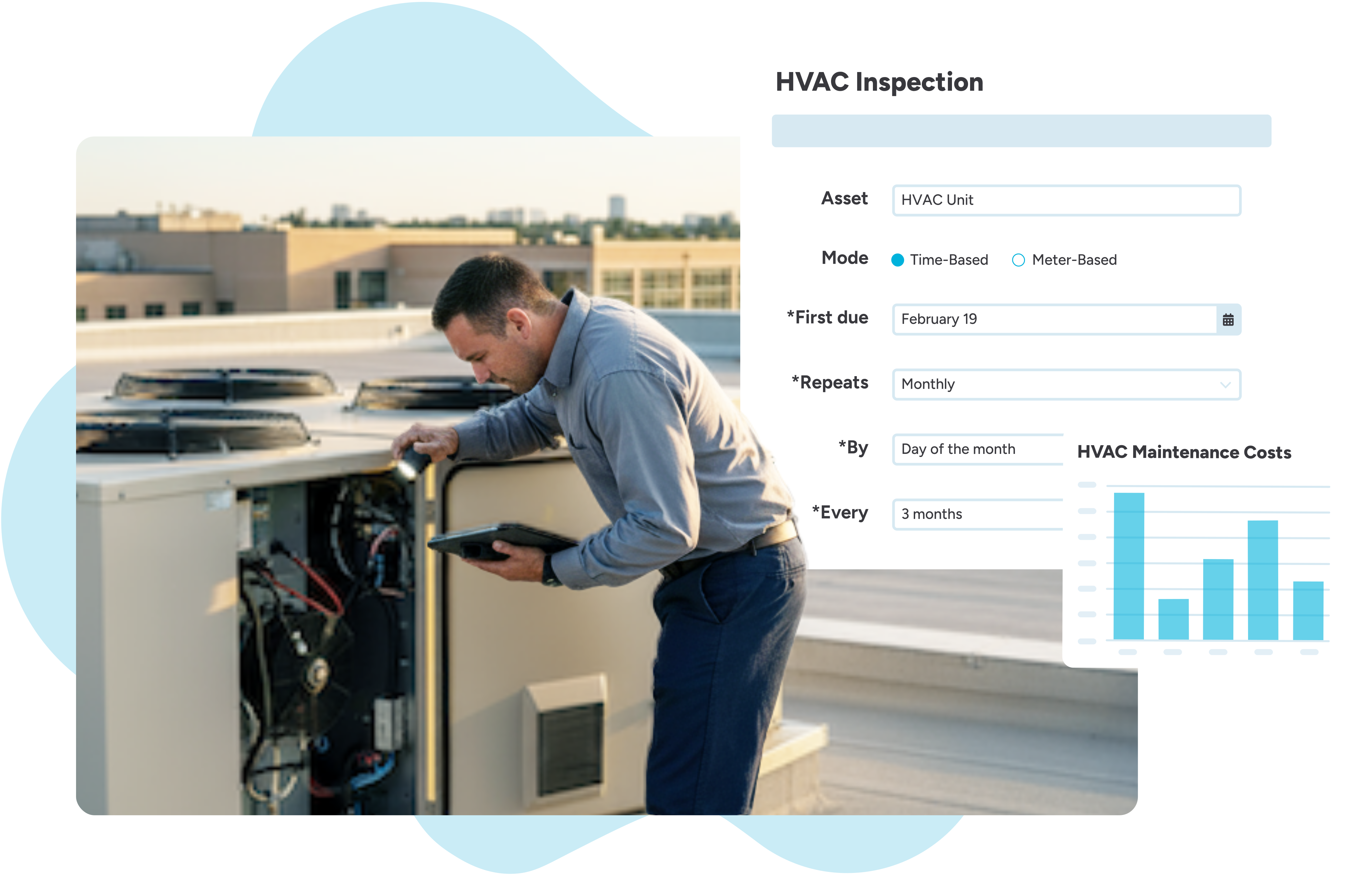
Asset management
Keep your assets up and running with routine inspections, timely maintenance, and insights into their condition and associated costs.
Track asset location, condition, cost, and usage
Know exactly where every asset is, its current condition and value, and how often it’s being used.
Manage work orders related to your assets
Manage, assign, and track maintenance and repair requests for all your district’s assets.
Create preventive maintenance plans to extend asset life
Schedule routine services and inspections to stay ahead of problems and maximize the lifespan of your equipment and assets.
Do it all on the go with our mobile app
Perform inspections, close out work orders, and create tickets from anywhere on campus using your mobile device.
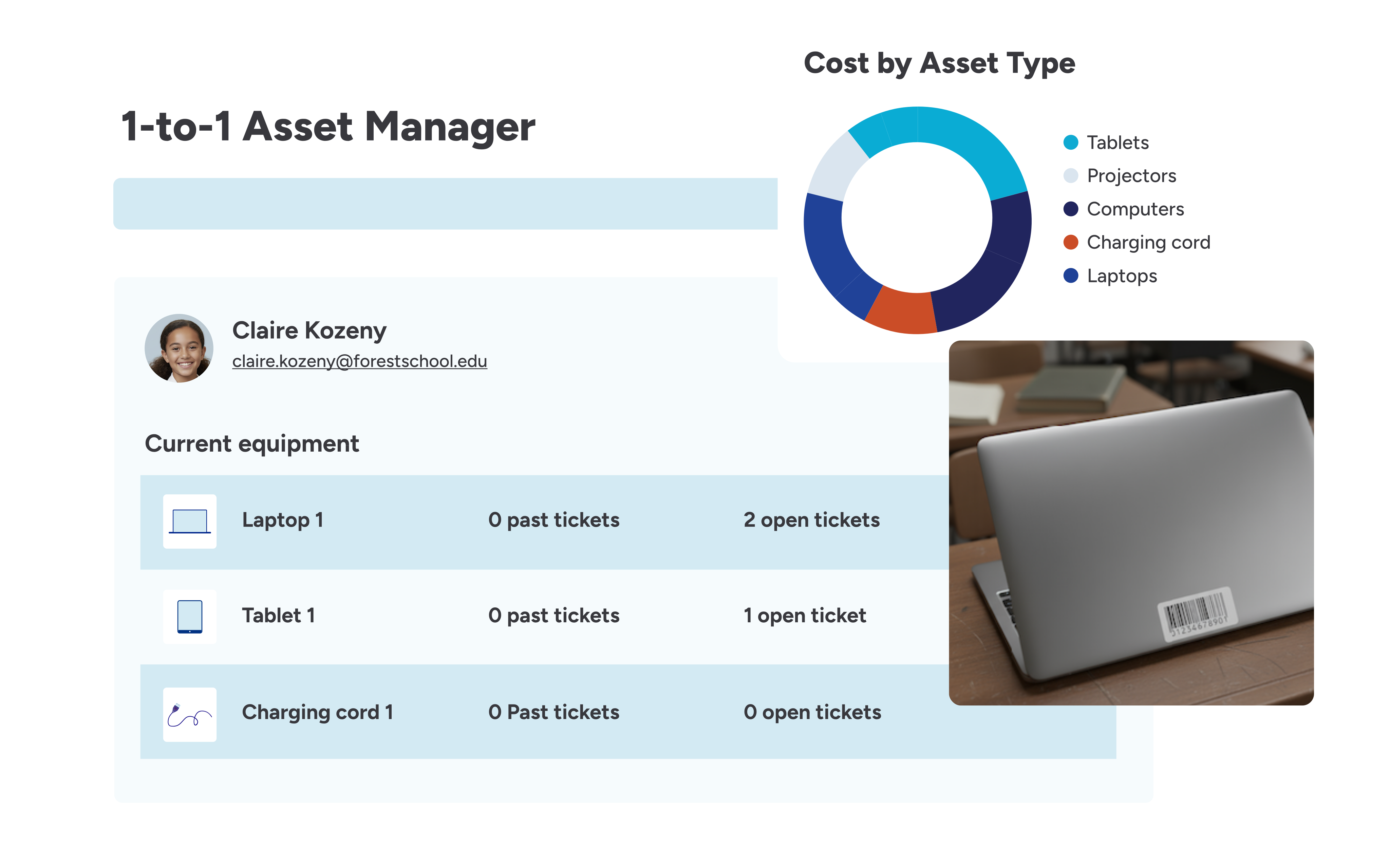
1:1 device management
Eliminate manual paperwork and ensure every device is accounted for from deployment to collection.
Assign, deploy, and collect student devices
Use barcodes to check devices in and out, so you can track ownership, status, and condition more quickly and accurately.
Manage your help desk tickets
Centralize device issues and other help desk needs in one location and proactively communicate status with requesters.
Integrate with your MDM or SIS
Connect with your MDM or SIS to ensure accurate student rostering and device status across all your systems.
Keep a pulse on device trends
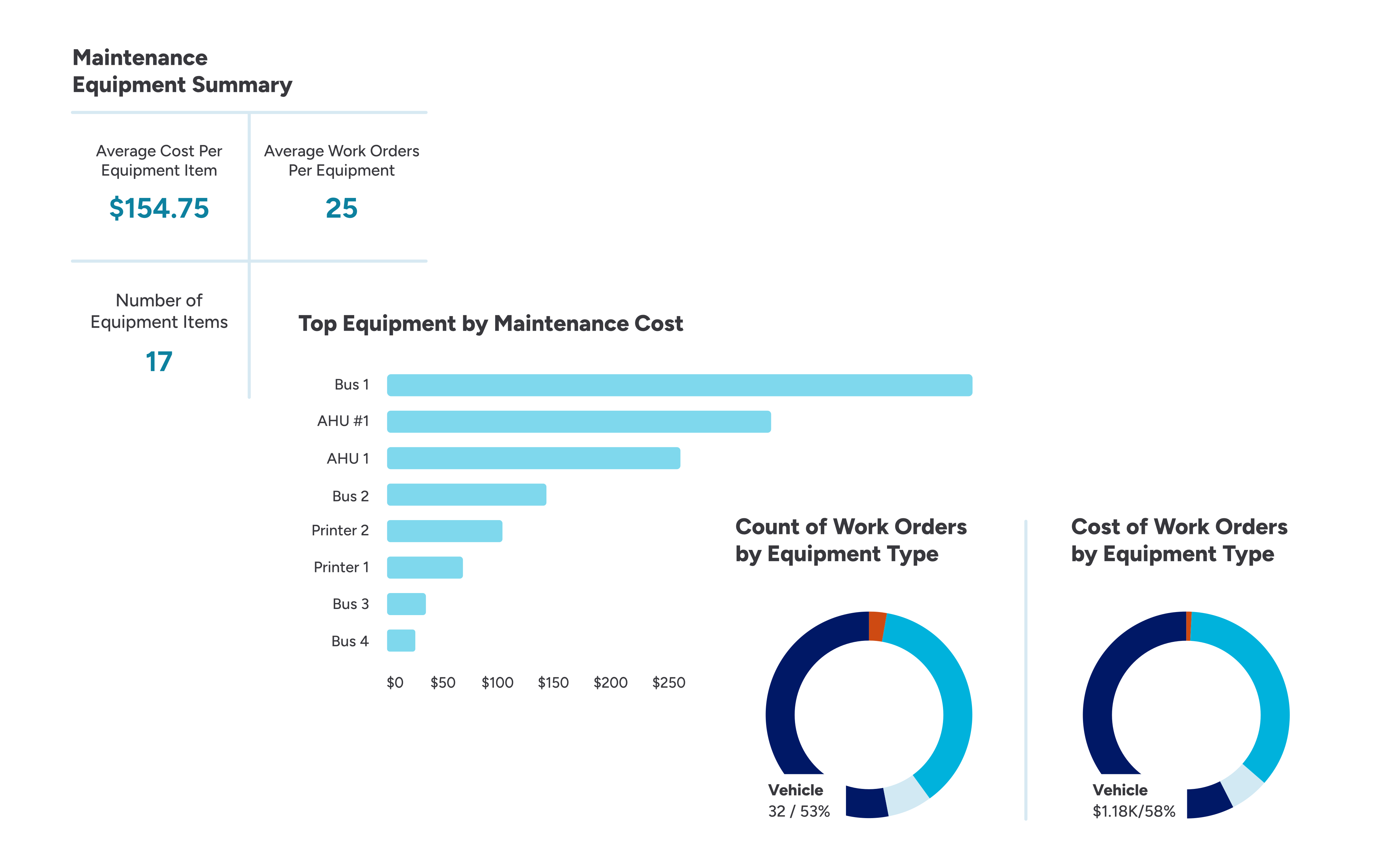
Generate actionable reports on device failure rates, repair trends, and total costs to make smarter budget and purchasing decisions.
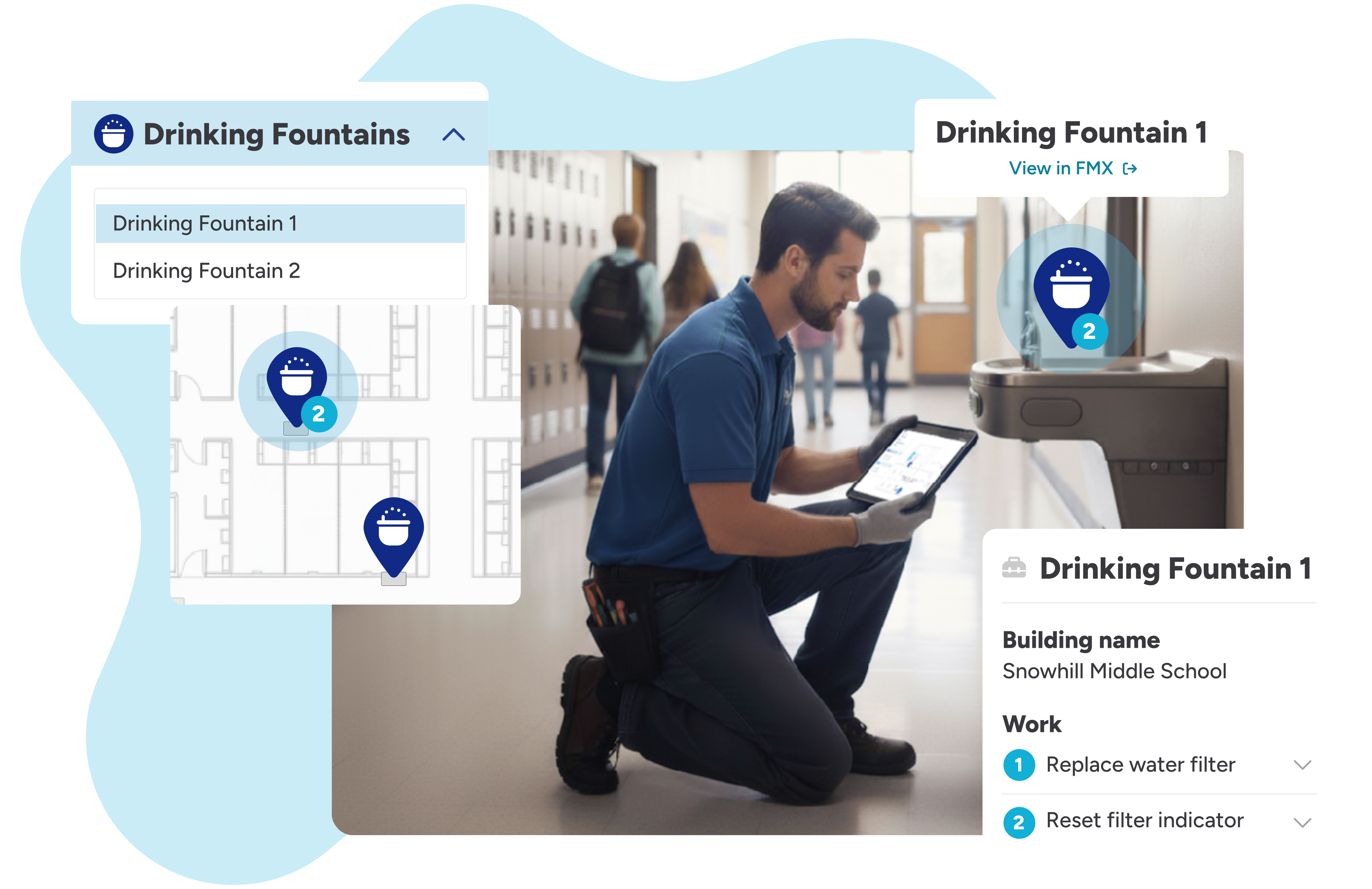
Interactive maps
View all assets and maintenance activities directly on your digital floor plans to enhance safety, improve technician routing, and expedite issue resolution.
Locate assets and devices
Locate safety equipment, shut-off valves, and other critical assets instantly on a map to drastically improve response time and district safety.
View locations of open work orders and PMs
Visualize all pending maintenance tasks on your floor plan to group work orders and inspections and optimize technician routes.
Upload floor plans and images
Easily upload your building floor plans and relevant location images to create a dynamic, visual map of your district.
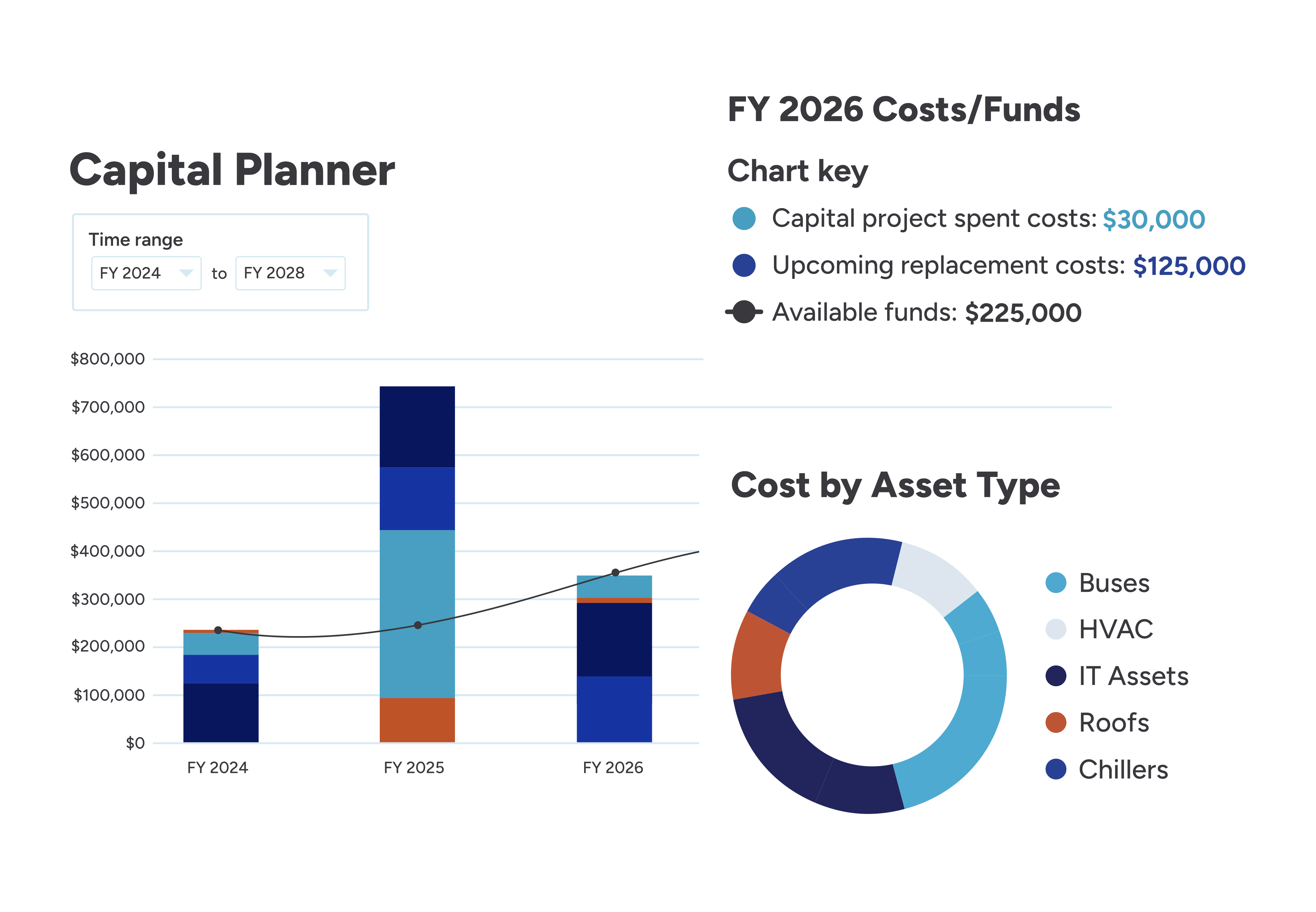
Capital planning
Proactively manage the future of your district by forecasting asset replacement costs and planning for additional asset needs.
Forecast asset replacement needs
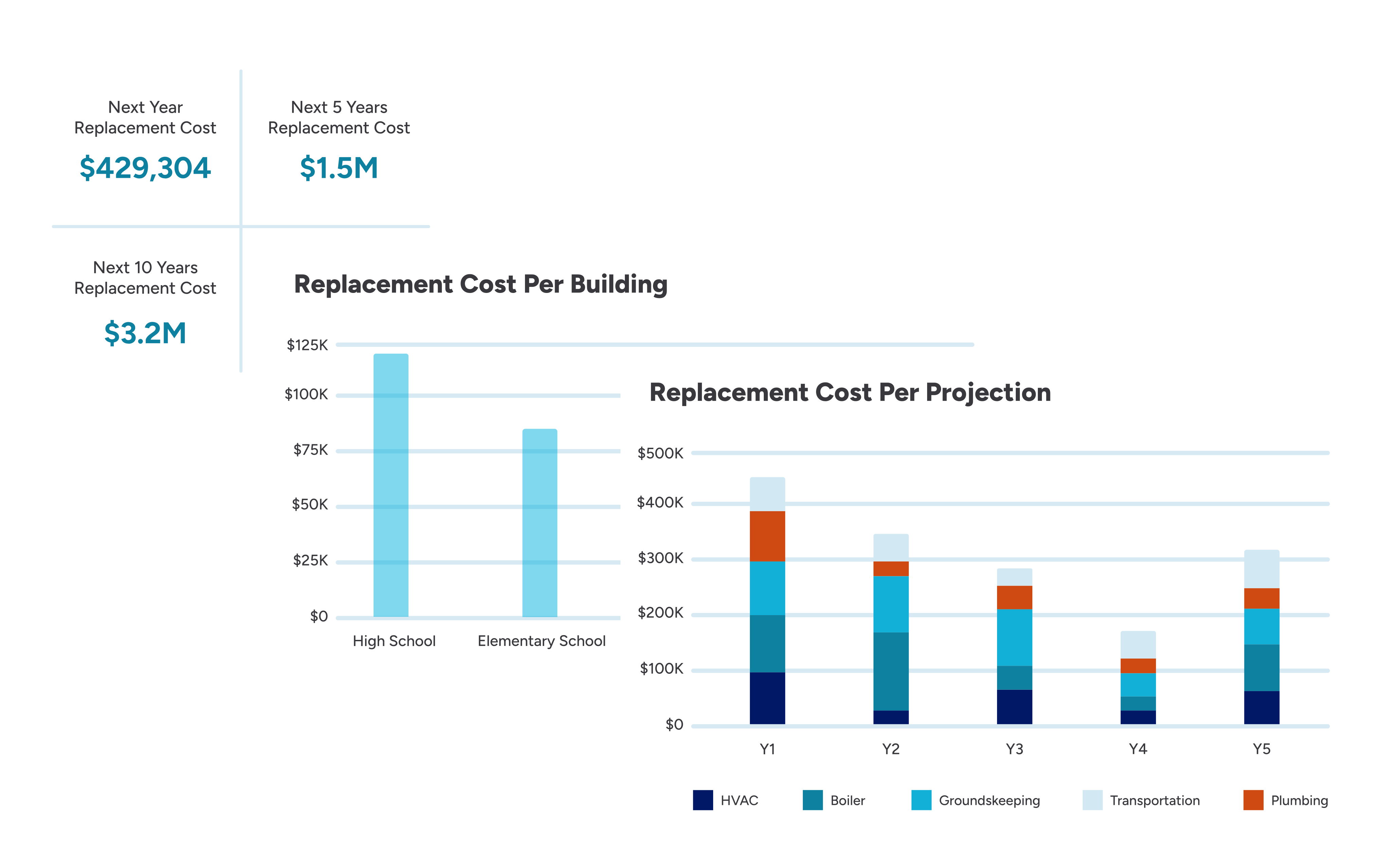
Predict timing and costs for major asset replacements like HVAC units or student technology to eliminate budget surprises.
Manage capital projects
Oversee and track budgets, timelines, and progress for large-scale capital projects, including renovations and new construction projects.
Plan for multiple budget scenarios
Run multiple budget scenarios simultaneously to model different funding levels and effectively prioritize asset needs.
Share plans with stakeholders
Generate forecasts and reports to share long-term capital plans with leadership, the board, and the community.
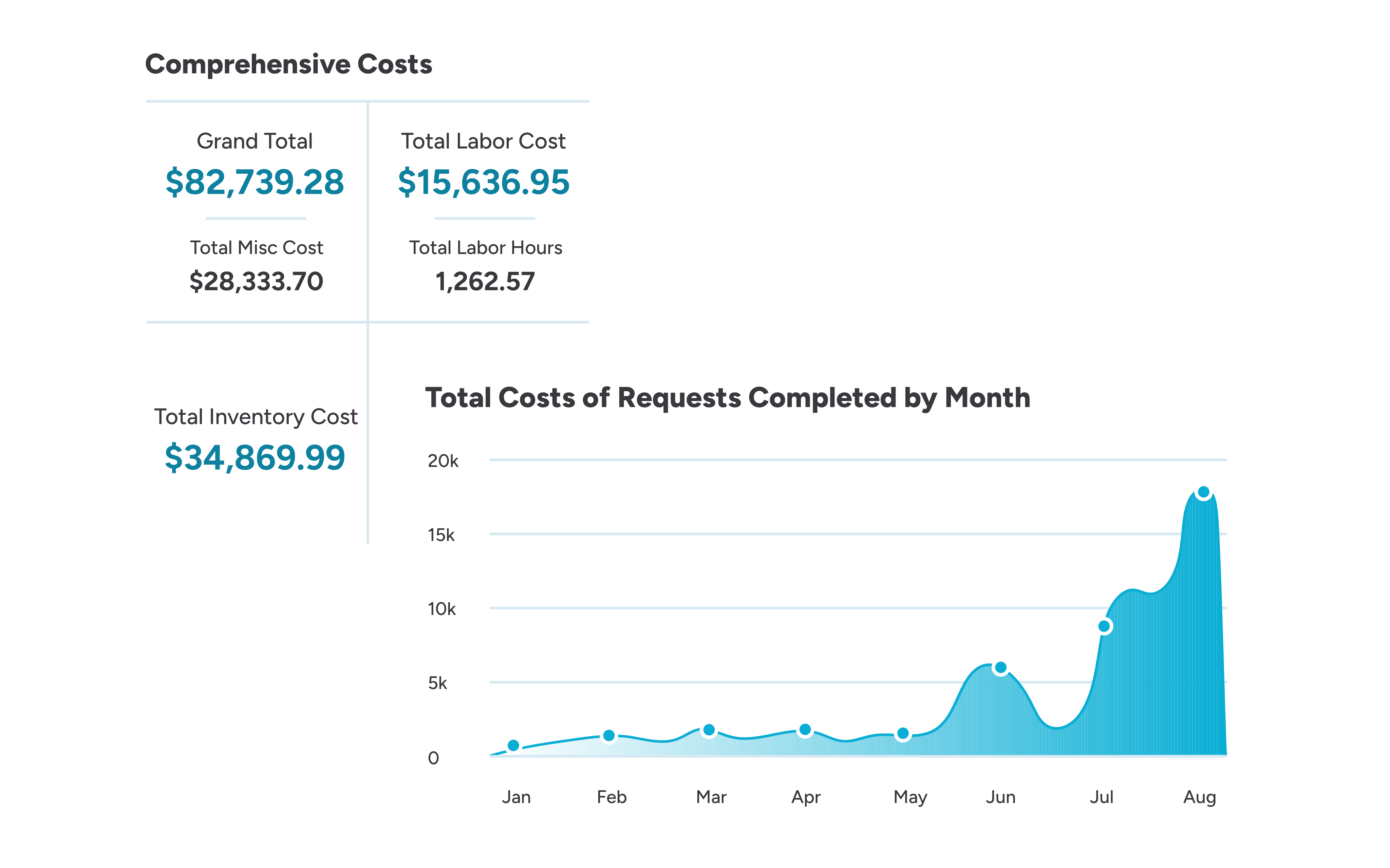
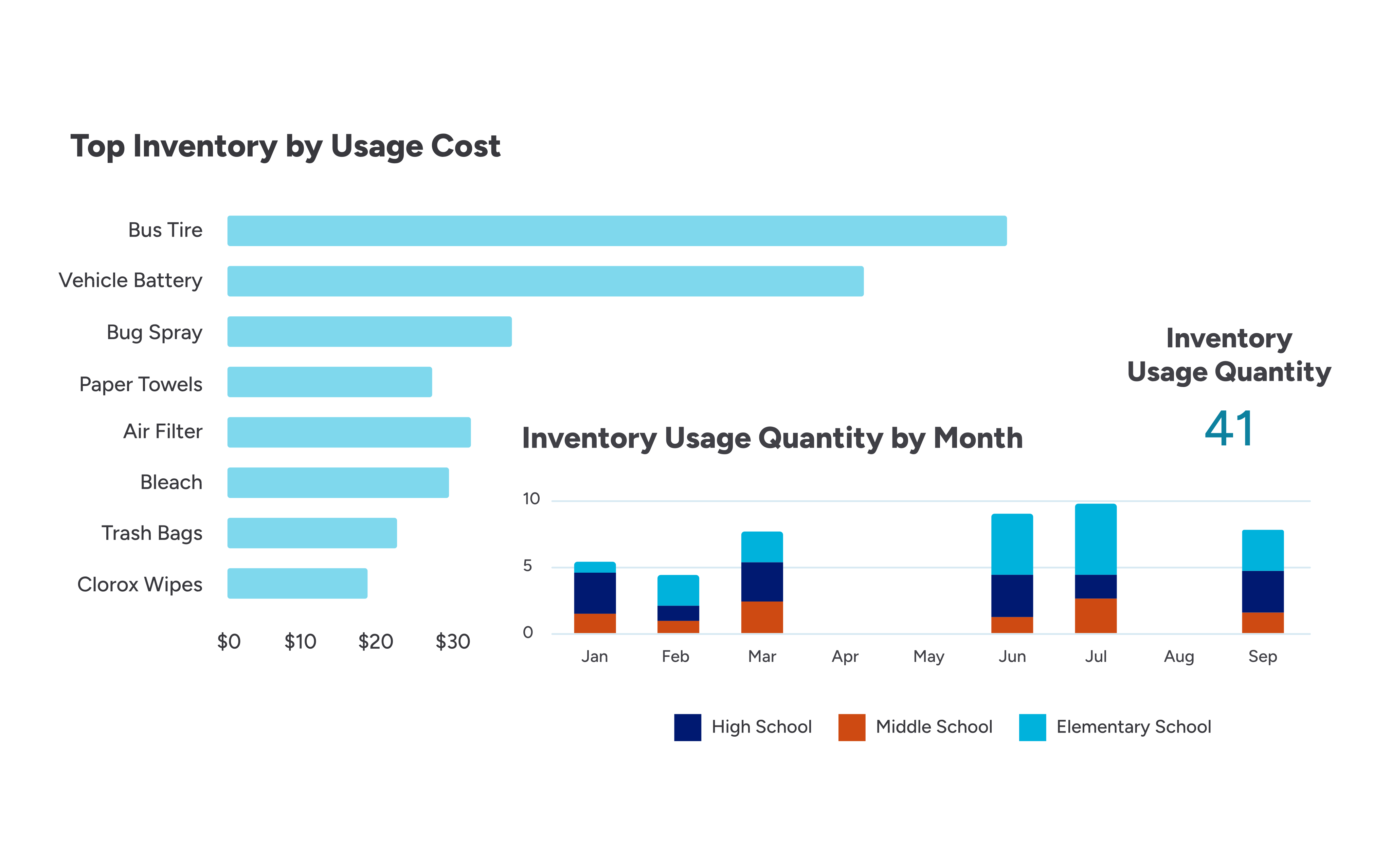
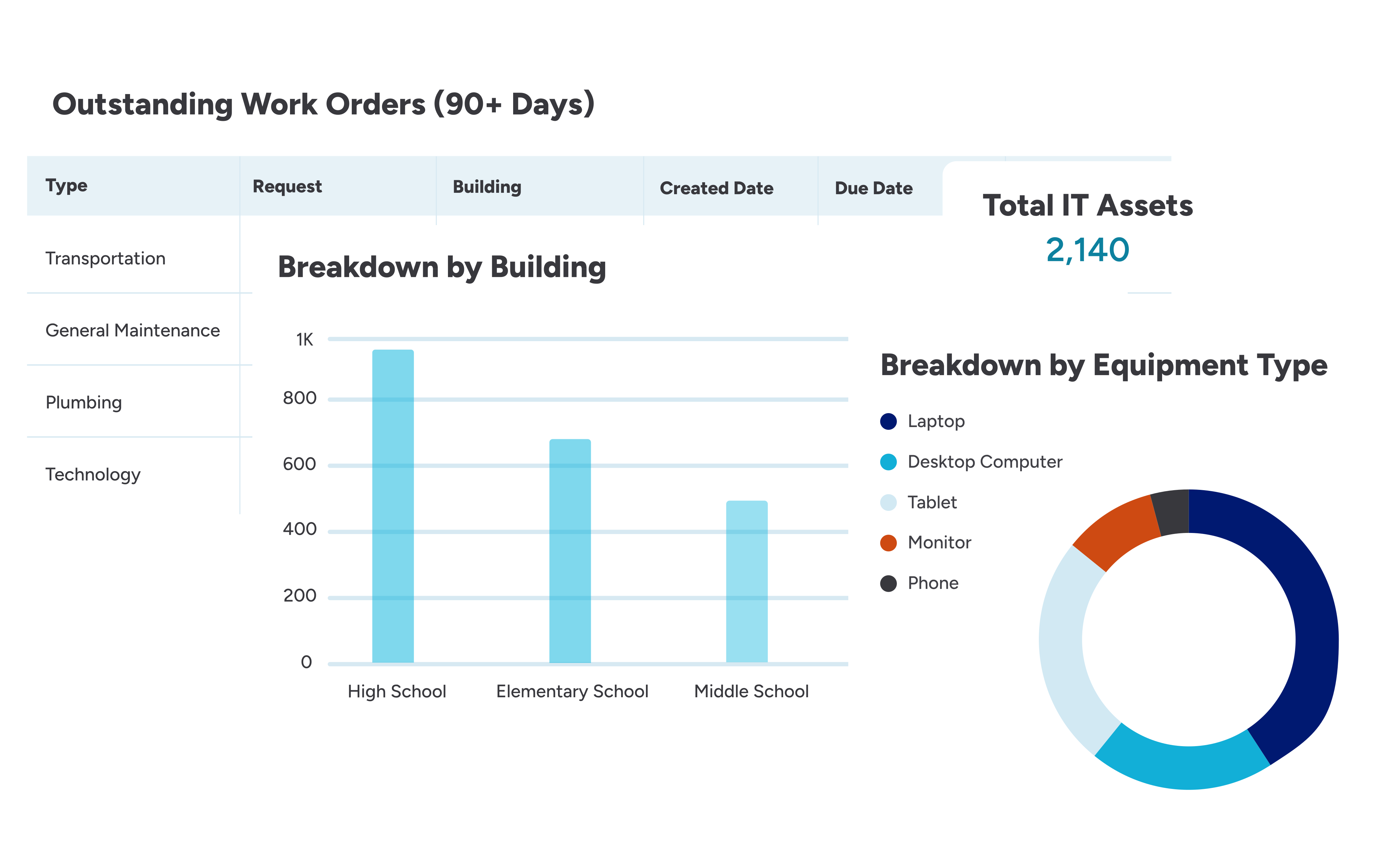
Reports to monitor your district’s assets
Frequently asked questions about school asset management software
What types of assets do schools typically track with asset management software?
Districts getting the most out of their system track everything from equipment to technology to fleet.
- School equipment often includes HVAC units, air handling units, boilers, freezers, refrigerators, ovens, and stoves.
- IT assets may consist of laptops, tablets, smartboards, printers, projectors, and 3D printers.
- Schools also track buses, vans, and other fleet vehicles in the system.
We recommend tracking as many types of assets as possible to gain a holistic view of your school’s operations.
How can schools track and report on compliance with school asset management software?
Comprehensive school asset management platforms allow schools to log inspection dates, service history, warranties, safety checks, depreciation schedules, manuals, and regulatory requirements for each asset. This makes it easy to demonstrate compliance with state, local, and federal guidelines.
Administrators can generate custom reports, dashboards, and summaries that show which assets are up to date, which require attention, and where gaps exist.
Barcode or QR scanning, mobile data collection, and automated workflows ensure that inspections and maintenance tasks are documented consistently across all buildings.
By centralizing this information, districts gain reliable, time-stamped evidence of compliance for audits, insurance claims, and capital planning, without relying on paper logs or manual spreadsheets.
How long does it take schools to enter all of their assets into an asset management system?
The amount of time can vary depending on the size of the district and the number of assets they need to inventory.
Modern asset management platforms streamline this process by offering data import tools, barcode/QR scanning, mobile data collection, and bulk-upload templates. The most advanced systems allow staff to take photographs of assets and will automatically suggest entry data like model number, serial number, manufacturer, replacement cost, and expected useful life.
Many districts start by uploading their most critical assets such as HVAC units, boilers, Chromebooks, and kitchen equipment, and then build out additional categories over time.
Schools can hire third party firms or select asset management software vendors to perform a facility condition assessment or asset inventory assessment. These services can include assistance with entering asset information and maintenance plans into the asset management system.
What is the cost of asset management software for schools?
There is no one-size-fits-all price for a typical school asset management system. It varies depending on the district’s size, the number of assets, and the feature set.
Some asset management or ticketing software vendors offer a limited free plan to get districts started (e.g., 50 assets for free), but will increase pricing beyond the baseline.
Many vendors bill customers based on user counts, school enrollment size, square footage, and/or products purchased.
Pricing based on products and enrollment can help maintain consistent and aligned billing with the school’s overall mission of serving its students. Consistent pricing allows districts to scale their team size without incurring additional costs.
What is a school asset management system?
An asset management solution helps districts understand the value, maintenance needs, location, and useful life of their asset collection from purchase to disposal.
Specifically, an asset management solution allows districts to manage the following:
- Capital projects and forecasting plans
- Work order and preventive maintenance workflows for their assets
- Check-in and check-out process for their IT assets (like tablets)
What is the difference between cloud-based vs. on-premises school asset management?
Cloud-based systems are hosted online and accessed through a web browser or mobile app. Schools benefit from automatic backups, real-time updates, mobile accessibility, and faster deployment across multiple campuses.
On-premises systems run on servers located within the district. While on-premises systems offer more direct control over hardware and security configurations, they typically require more maintenance, larger upfront costs, dedicated IT support, and slower upgrade cycles.
Most K-12 districts choose cloud-based solutions because they are easier to support across large, distributed school environments. Cloud-based systems deliver greater accessibility, faster implementation, and lower long-term maintenance.
How can barcodes be used for inventory tracking?
Barcodes and QR codes enable you to quickly and accurately identify, locate, and record inventory items by scanning labels instead of manually typing IDs. Some typical uses and benefits include:
- Unique identification: Attach a barcode or QR code to each inventory item, equipment asset, or storage location, ensuring each piece has a unique, scannable ID.
- Check-in/check-out and reconciliation: Scan items when they move in or out, or when performing inventory counts, to update quantities and reconcile records quickly.
- Faster data entry: When you scan the barcode, it automatically inserts the barcode value into name, tag, or custom text fields, allowing you to pull up the exact inventory or equipment record without manual search or typing.
How does asset management overlap with preventive maintenance?
Preventive maintenance (PM) is a crucial component of effective asset management. To properly manage assets, it’s essential to perform regular inspections and preventive maintenance to maximize lifespan and prevent downtime.
While PM is an essential part of asset management, it’s not the only component. Proper asset management also includes managing reactive maintenance (like work orders) and leveraging a capital planning tool to understand remaining useful life and plan for repairs or replacements.
Products purpose-built for school asset management
FMX’s suite of products was built for school districts to track, manage, and optimize all of their assets.

Track every work order from start to finish to eliminate backlogs and keep your team moving forward. Easily schedule preventive maintenance to avoid unexpected downtime.

Submit IT tickets, deploy 1:1 devices, send invoices, schedule recurring tasks, and track key metrics like ticketing trends and repair costs.

Leverage reports and dashboards to properly allocate budget and resources to align with future asset replacements and capital projects.
Connect with a product specialist to learn how FMX can help you plan, manage, and optimize your school asset management strategy.
The importance of a unified school asset management system
- Unified asset management
- IT asset management
Complete budget visibility
Provides a comprehensive capital forecast for both IT and facilities assets, including HVAC, roofing, and equipment.
- Unified asset management
- IT asset management
Campus safety & response
Maps the location of all critical assets (fire extinguishers, shut-off valves, AEDs) to enhance emergency response for staff and first responders.
- Unified asset management
- IT asset management
Unified work order system
Centralizes all work orders in one system, from a broken tablet (IT) to a leaky faucet (facilities).
- Unified asset management
- IT asset management
Condition assessment for all assets
Tracks the condition and remaining useful life of IT assets and buildings, grounds, and infrastructure.
- Unified asset management
- IT asset management
Schools get the most out of their assets with FMX
Benefits of a centralized asset management system for schools
- Prevent equipment failures and significantly extend asset life through proactive scheduling and well-planned routine maintenance.
- Keep track of school property with access to precise location, condition, and usage history of every asset and student device.
- Make smarter purchasing decisions by generating clear reports on asset failure rates, repair trends, and total cost of ownership.
- Streamline deployment days with a quick check-in/check-out process that records device condition and student assignment instantly.
- Improve emergency response time by instantly locating critical safety assets and shut-off valves on an interactive campus map.
- Prepare for the future by accurately forecasting asset replacement costs and modeling various budget scenarios for long-term capital projects.
Learn more about buying and implementing school asset management software
Get started
Increase asset lifespans and prevent unnecessary breakdowns.
Frequently asked questions about FMX
How will FMX support my team and users?
We proudly offer lifetime support for all FMX customers. You will be assigned a dedicated account manager who will meet with you regularly to discuss your specific needs.
Additionally, all users have access to webinar training, where they can learn how to submit and close work requests, as well as how to configure their personal settings.
Our support ticket response time is 30 minutes, and we have a 98% customer satisfaction rating.
Is school asset management a standalone product?
School asset management is a use case that requires multiple products from FMX.
How much will FMX cost our organizations?
Pricing varies by district, and there is no fixed price point.
FMX is priced based on the products purchased and the number of students in your district.
How long does the implementation process take? And will FMX help?
Your FMX site is expected to go live within 60 days of your initial start date. The implementation follows a structured, multi-meeting process (kick-off, data review/pre-configuration, site review/admin training, and user training), and FMX provides templates and support for data import, SSO setup, and module configuration.
FMX’s Customer Success Team leads the technical setup, configures site settings and user types, and runs admin and end-user training sessions. Customers are also given a dedicated Customer Success Manager and have access to support for assistance.
Can FMX integrate with other software?
Yes, FMX can integrate with many systems. FMX provides a REST API and pre-built integrations to connect with scheduling platforms, fleet telematics, MDMs, payment processors, BAS systems, identity providers, and more.
How many assets can schools track with FMX?
With FMX, you can track an unlimited number of assets and devices. Unlike systems that restrict your inventory with limits on asset count (e.g., a free tier cap of 50 assets) or user licenses, our pricing is not designed to penalize your district for team growth.
You won’t face sudden price jumps for adding more equipment, expanding your 1:1 program, or growing your maintenance team. Our model ensures you can manage everything on campus without worrying about hitting a hidden license limit.
Does FMX partner with any purchasing cooperatives?
FMX partners with several purchasing co-ops:
- 1GPA for cities, counties, state entities, public schools, private schools, colleges, universities, and Native American communities.
- TIPS-USA for cities, counties, state agencies, federal agencies, emergency service districts, park and water districts, Native American tribes, transportation authorities, K-12 schools, charter schools, private schools, Special Education districts, colleges, universities, churches, hospitals, nursing homes, member associations, and charitable associations.
- AEPA for municipalities, K-12, higher education, non-profit, and other organizations.
If you’re in Ohio, we partner with the Ohio Schools Council (OSC) for school districts, JVS, ESC, and DD boards. This can also extend to private schools, libraries, municipalities, and other government entities through an affiliate membership.